Onboard others to your team and give them access to your website traffic analytical data.
Note that people are invited in a project basis, so if you want to grant someone with access to multiple of your websites analytics data, she must be invited for each website.
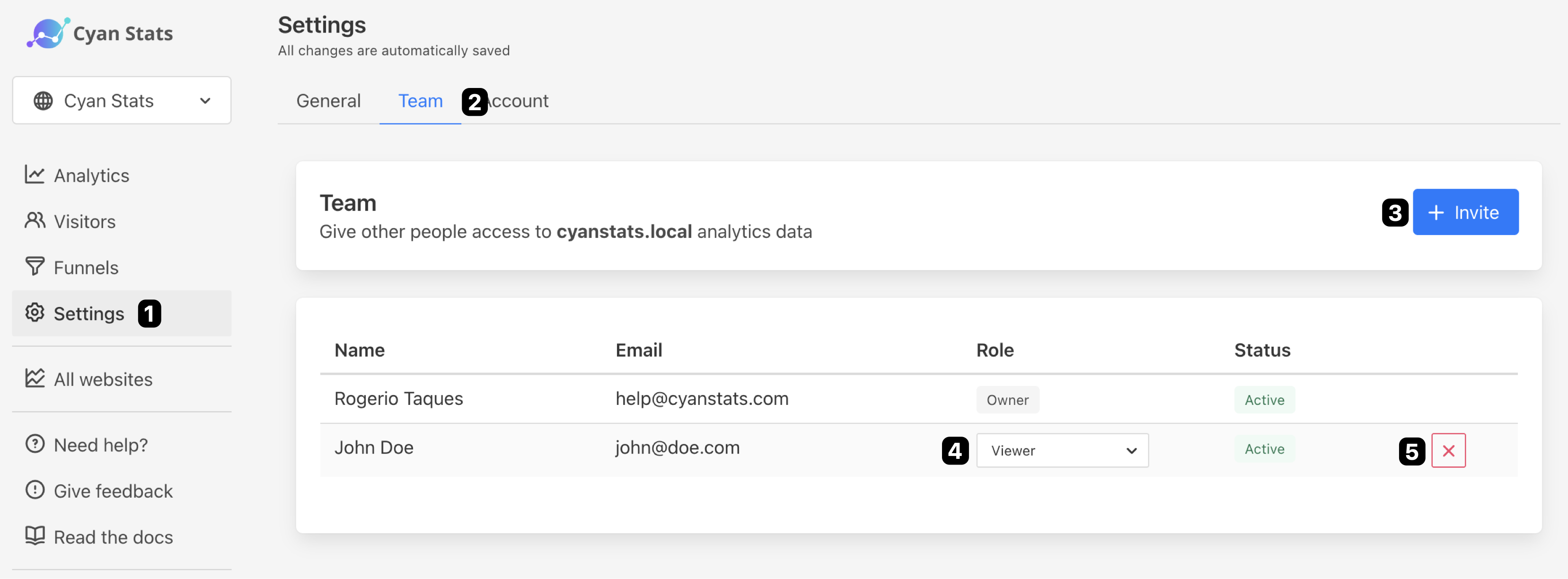
- Go to Settings → Team
- Clique on Invite
- Fill the email address you want to invite in the form
- Click on Invite
- Done 🎉
If your invitee already has a Abtz Analytics account, she will receive an email to confirm that she wants to join your team, otherwise, she will receive an invitation to create a free Abtz Analytics account.
By default, people are invited as Viewers .
Status
An invitation can have 2 statuses:
Invitedwhile invitations are pendingActiveonce the invitee accepts to join your team
Roles
People you invite can be assigned one of the following roles:
Viewerhas read-only access to your dashboardAdmincan make changes to your website settings, but cannot see billing information or invite new members to your team.
💡 People invited to join your team are not required to subscribe and pay for Abtz Analytics, unless they decide to add their own website.